BestChange Review
BestChange is a popular exchanger monitoring platform — a service that collects and organizes offers from third-party exchange sites based on the selected exchange direction. Its purpose is to display up-to-date rates, available reserves, and the reputation of platforms so that users can quickly find a profitable and reliable option. The site itself does not perform exchanges or hold funds: after selecting a suitable offer, you are redirected to the exchanger’s website to complete the transaction directly. This approach saves time on manually comparing dozens of sites, reduces the risk of mistakes, and helps avoid overpayments due to hidden fees or insufficient reserves on a specific service.
What is BestChange and how does it work
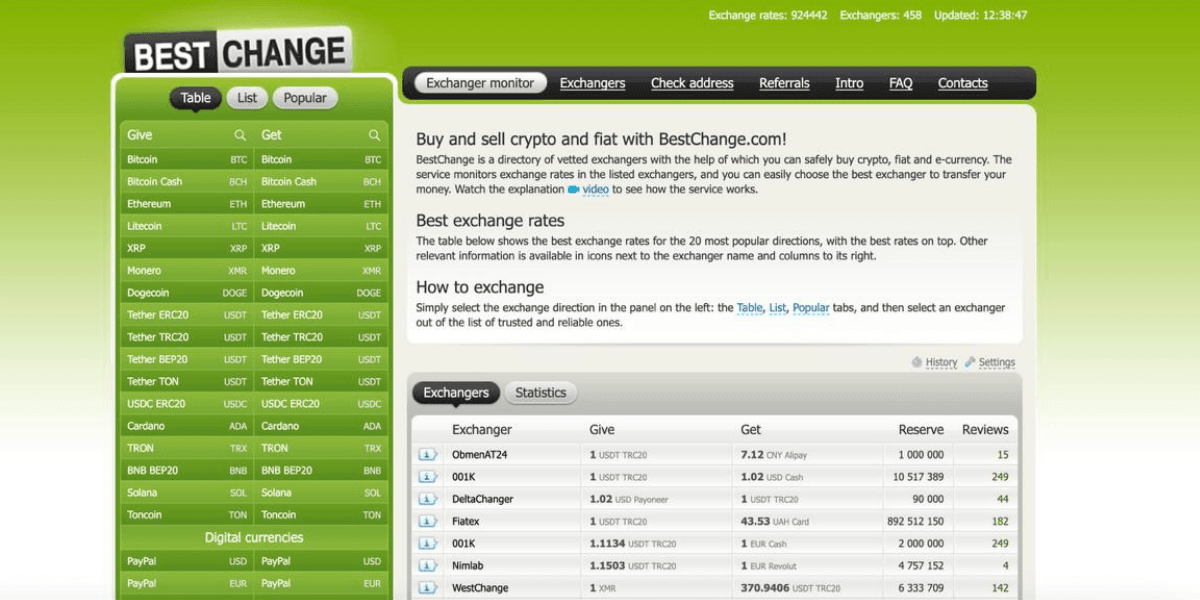
BestChange is an online exchanger monitoring platform that collects and organizes up-to-date offers for exchanging currencies, cryptocurrencies, and electronic money. The service operates as an aggregator rather than an exchanger: it does not accept or send funds but simply displays a list of third-party platforms where an exchange can be made in the selected direction. The principle is simple — you choose a pair (“Give / Get”), and the system generates a table of exchangers sorted by rate and other parameters.
Each row in the table contains key information: the current rate, available reserve, minimum amount, type of processing (automatic or manual), as well as reputation indicators — rating and user reviews. By clicking on an offer, you are redirected to the selected exchanger’s website, where you place an order according to its rules. BestChange itself does not participate in the transaction and bears no responsibility for the exchange but helps compare conditions and choose a verified partner.
The advantage of this monitoring system is that it saves time and reduces the risk of mistakes: you don’t have to manually check dozens of websites, look for current rates, or verify reserves. All this is gathered in one interface, updated in real time. At the same time, it’s important to remember that the final rate and fees are always confirmed directly on the exchanger’s website — BestChange only displays current data, helping you make an informed decision.
BestChange for Ukraine: directions and specifics
Ukrainian users most often look for exchanges involving the hryvnia (UAH) and payouts to bank cards. It’s important to check not only the rate but also the actual UAH reserve to ensure the transaction goes through without splits or delays. Due to market volatility, offers for certain pairs may appear and disappear, so it’s wise to have 2–3 alternative exchangers with similar conditions. When dealing with bank transfers, check the processing time regulations and possible time windows. If the monitoring site is temporarily unavailable, you can use mirrors or alternative aggregators and then return to the familiar interface.
Popular UAH pairs
Demand is traditionally focused on crypto↔UAH directions with payouts to bank cards. For less common combinations, it’s useful to view related pairs or check back later when reserves are updated. If you need cash payouts, confirm the format and limitations in advance — such operations usually have separate regulations and depend on availability in a specific city. In any case, compare not only the rate but also the final credited amount, taking into account fees and possible tiered limits, and keep transaction confirmations to simplify communication with support.
UAH reserves and specifics of payouts to Ukrainian banks
The UAH reserve determines whether the exchanger can process your request fully and without delay. For large amounts, it’s better to choose a platform with sufficient reserve and clarify the possibility of partial payouts. Bank transfers in hryvnia may have specific processing windows, especially when handled manually — keep this in mind when planning your timing. If your amount is close to the maximum reserves available on the market, check 2–3 options and prepare a backup route. Following the exchanger’s regulations and keeping all confirmations will make it easier to resolve any issues with customer support.
How to use BestChange - step-by-step instructions
The logic of use is simple. First, choose the exchange direction — what you’re giving and what you want to receive. The service will generate a table of available exchangers with rates and reserves. Then, enter your amount — it’s convenient to check whether the reserve is sufficient and whether you meet the minimum threshold. If necessary, apply filters and open several top offers to compare terms and reviews. After selecting a suitable platform, go to its website to confirm the calculation, enter your details, and submit the request. At this stage, it’s important to carefully check fees and payment details to avoid mistakes and save the transaction confirmation.
Step 1. Choosing the direction (currencies / payment systems / UAH)
Find the list of source and target currencies, then select the desired pair. For Ukraine, the most common exchanges involve UAH and bank card payouts. If the pair you need is rare, try similar options or check back later — offers depend on demand and reserves. Clarify what type of transfer is used for the receiving currency (bank account, card, e-wallet), as limits and fees may differ. Don’t rush after an overly “sweet” rate at first — make sure the exchanger has sufficient reserve and a clear policy.
Step 2. Entering the amount and using the calculator
After choosing a pair, enter the amount you’re giving or want to receive. The calculator will show an approximate result based on current rates, and you’ll immediately see which exchangers have enough reserve for your transaction. If the system notifies that your amount is below the minimum, consider alternatives: increase the sum, split the operation into two parts, or choose another service. For large exchanges, it’s useful to check whether the rate changes with volume — some exchangers apply tiered conditions. At the final step on the exchanger’s site, compare the “draft” calculation from the monitor with the “final” one in the order form.
Step 3. Filters: reserves, limits, auto/manual mode, speed
Filters save time. Select exchangers with reserves not lower than your amount and exclude options with unsuitable minimums. If speed matters, pay attention to automatic processing — automation is usually faster but more strict about details and amounts. Manual processing is more flexible for unusual cases but can take longer. With equal rates, prioritize clear rules and well-described service terms. Don’t focus only on the first line in the list — check two or three nearby options to have a backup plan.
Step 4. Checking the exchanger’s card: reviews, website, regulations
Open the exchanger’s card — it includes a short description, link, total number of reviews, and main conditions. Look not only at the number of reviews but also at their content: what users say about payout speed, rate accuracy, and support in case of delays. Check whether there’s a clear time policy and contact channels listed. When visiting the exchanger’s website, compare the final amount and make sure the fees and payment details match expectations. If something seems suspicious, go back to the list and consider another option.
Step 5. Going to the exchanger and submitting the order
By clicking on an offer, you go to the exchanger’s website, where you fill out the form — amount, payment details, and contact information. Check the domain and SSL certificate to ensure the payment page belongs to the selected service. Before confirming, once again compare the final amount with the monitoring site’s calculation — there might be rate fluctuations or extra fees. Save receipts, transaction IDs, and correspondence with support. If manual processing is required, check the approximate completion time; for automatic exchanges, monitor the status until the funds are actually credited to your account.
BestChange Features and Tools
The key interface is a comparison table for the selected pair, showing the rate, general conditions, and reputation metrics. For convenience, filters and amount input are available to instantly assess whether an offer fits your transaction volume. Each exchanger’s card provides a link to its website and a brief description, while the review system helps correlate “good” rates with actual payout performance. This set of features is sufficient for everyday use: choose a direction, compare 2–3 candidates by the “amount to receive,” check the rules, and then proceed to complete the exchange on the selected service’s website.
Calculator and rate/reserve alerts
The calculator lets you quickly see how much you will give or receive at the current rate. It’s handy for selecting offers with sufficient reserves and comparing the final amounts among top exchangers. In some cases, you can subscribe to notifications about direction changes or more favorable conditions, which saves you from manually monitoring the table. However, even with the calculator, it’s worth making a final calculation on the exchanger’s website — it accounts for network fees and rounding differences that affect the final credited amount.
“Double exchange” (via an intermediate currency)
If a direct pair is unavailable or its rate is unfavorable, you can consider exchanging through an intermediate currency. Sometimes the “A→C→B” route is more accessible or faster than a direct one, especially when liquidity is low. This method adds one extra step and commission, so it’s important to carefully recalculate the totals at each stage and verify reserves. It’s useful when flexibility matters and you have time for two consecutive transactions. Always compare the overall result with the direct rate — the difference should justify the additional risk.
Reviews and reliability status/badges
Reviews are the main reputation indicator: they show how a service handles payouts, responds to inquiries, and resolves disputes. Pay attention to recent comments — consistent positive trends matter more than the total number of reviews. Statuses and badges in the monitoring table indicate that the exchanger has passed a basic verification and supports the listed directions. While badges alone don’t guarantee instant payouts, they help filter out completely new or opaque platforms. In doubtful cases, choose options with clear policies and a long review history.
Additionally: mobile clients, extensions, bots
Many users prefer tracking rates from their phone or browser. It’s convenient when the monitoring interface is adaptive and allows you to select pairs, enter amounts, and open exchanger cards with minimal clicks. Bots and browser extensions, when available, serve a focused purpose — to quickly check the rate and access the exchanger card. Still, the core value lies in the main table and its filters: they save time, help you catch the right reserve in time, and avoid mistakes during comparison. Extra features are useful but never replace careful verification of final details.
Advantages and Disadvantages of BestChange — translation
The main advantages are time savings on comparisons, a clear table by exchange directions, visible reserves, and access to reviews — all of which help reduce operational risk. For beginners, it’s an easy entry point: the interface is intuitive, and basic filters allow quick selection of working options. The limitations stem from its role as an aggregator: final conditions and speed depend on the specific exchanger; discrepancies may occur due to volatility. Therefore, when choosing, always compare the “amount to receive” and keep 2–3 alternatives. This approach combines the convenience of monitoring with practical caution during payment.
Advantages for beginners and experienced users
Beginners appreciate the simple navigation: choose a pair, enter an amount, view the top offers and reviews. This lowers the entry barrier and helps avoid obvious mistakes. Experienced users benefit from more advanced tuning: filtering by reserve and limits, comparing final amounts among several candidates, and assessing reputation. For large transactions, payout discipline and predictable processing times are crucial. In both cases, the key principle remains the same: don’t chase the “best line” blindly — check the whole picture, including rate, fees, reserve, speed, and support quality.
How to safely choose an exchanger on BestChange
Security starts with reputation. Look not only at the rate but also at reviews, how long the service has been listed in the monitoring, and whether clear contact information and terms are provided. For large amounts, check the reserve and allowed limits. Give preference to platforms with transparent calculations — where it’s clearly stated whether fees are included in the rate and whether there are additional charges. Eliminate the “human factor”: never agree to transfer funds to details not listed in the order, and don’t switch communication channels without necessity. Always make a final recalculation before payment and keep transaction confirmations and correspondence.
CEX.IO on BestChange
On BestChange, there is a dedicated information page about the cryptocurrency exchange CEX.IO — it features a brief description of the service, a link to the official website, and user reviews. This is not a regular offer in the exchangers table but rather an info card that helps users understand what the platform is, how long it has been operating, and how users’ transactions have gone.
The CEX.IO exchange has been operating since 2013 and functions within the legal frameworks of several jurisdictions in compliance with local financial regulations. The platform supports dozens of currencies and fiat pairs, including USD, EUR, GBP, and cryptocurrencies such as BTC, ETH, USDT. Thanks to strict security standards, CEX.IO is popular among users in many countries.
Choosing CEX.IO is a good option if you’re looking for a regulated platform for secure exchange or regular trading, value transparent fees, an advanced ecosystem (wallets, staking, API), and a high level of account protection. The exchange is well suited for those who prefer officially operating services with clear rules and reliable infrastructure.
Get cryptocurrency using a debit or credit card.
Start your crypto journey today with ease. Buy leading cryptocurrencies using a debit or credit card and get instant access to the world of digital assets.
Frequently Asked Questions
Is BestChange an exchanger or a monitoring service?
It’s a monitoring service. It aggregates rates, reserves, and reviews from third-party exchangers and redirects you to the chosen service’s website. You send money to the exchanger, not to BestChange, and according to its rules. Therefore, the final conditions — rate, fees, limits, and time frames — are determined there. The monitoring service’s role is to save you time on research and highlight reputation indicators. Before making a payment, always double-check the “amount to receive” and keep confirmations so you can quickly resolve any issues with the exchanger’s support if needed.
Why does the rate on the aggregator differ from the exchanger’s rate?
The difference is explained by market dynamics and the fee structure. The monitoring service displays quoted rates, but at the time of placing an order, the exchanger may recalculate the total due to volatility, network load, or tiered conditions. In addition, part of the fees may be included directly in the rate, while another part appears as separate lines in the form. The best practice is to compare the final amount on the exchanger’s side with the preliminary calculation, take a screenshot to record it, and, if the conditions change significantly, choose an alternative from the list.
What is a “reserve” and how can you tell if it’s sufficient?
A reserve is the available amount of the currency you’re receiving that a specific exchanger currently holds for the selected direction. If your amount exceeds the reserve, the transaction can’t be completed in full immediately — it may be split, delayed, or declined. Compare your amount with the reserves of 2–3 top exchangers and choose one with sufficient margin. For large transactions, check with support whether the service can quickly replenish its reserve. This verification helps reduce the risk of freezes or unexpected delays when crediting funds to your account or card.
How can you check an exchanger’s reliability before making a deal?
Check recent reviews and their content — payout speed, rate accuracy, and support responsiveness. Evaluate how long the exchanger has been listed in the monitoring and how transparent its rules are: clear time frames and contact details are a good sign. Compare the “final amount” across two candidates — a suspiciously “sweet” rate often hides unfavorable terms. Verify the exchanger’s domain and SSL certificate, and never send funds to payment details not listed in the order form. If you have doubts, choose an alternative from the list with a proven reputation and a solid record of completed transactions.
Is KYC required for an exchange, and when?
Verification requirements depend on the exchanger, the amount, and the payout method. For bank transfers and large transactions, KYC is requested more often — this aligns with anti-fraud procedures and payment system regulations. Usually, you’ll be asked for an ID photo and proof of card or account ownership. Verification takes extra time but increases security. When planning a significant transaction, prepare your documents in advance and check the verification policy to avoid your transfer being delayed for additional checks after funds have already been sent.
Can you exchange crypto to a Ukrainian bank card?
Yes, such directions are in high demand and often available among exchangers. Availability depends on current offers and UAH reserves. Always check the minimum and maximum limits as well as the payout time policy. For smooth and fast processing, use cards issued in your name and follow the exchanger’s requirements. Compare the final amount across several options and record the calculation before payment. If the desired pair isn’t available at the moment, check similar options or come back later when offers are updated.
What should I do if BestChange doesn’t open?
Check your connection and the domain spelling, try an alternative access point (mirror), or temporarily use another aggregator to compare rates. In any case, keep the same security practices: make the final calculation on the exchanger’s side, verify reserves and policies, and save confirmations. Avoid random links and always check the SSL certificate to ensure you’re not on a phishing copy. Return to the main domain as soon as possible and update your bookmarks to continue using the familiar interface.
How does monitoring differ from P2P exchange on an exchange?
In P2P exchanges, transactions take place between users under the exchange’s escrow system — offering more flexibility in payment methods and pricing, but requiring greater caution when verifying counterparties. Monitoring, on the other hand, displays offers from exchangers with fixed rules and user reviews. If you value speed and simplicity, monitoring is more convenient; if you’re looking for specific payment combinations or aggressive pricing, P2P may be more appealing but carries higher risk. The best approach is to compare the “final amount” and choose the tool that fits your specific goal.
How can I receive notifications about a favorable rate or reserve?
It’s not always convenient to track rates manually, so it’s useful to use subscriptions for direction changes or price level tracking where available. Set up notifications for the desired pair and specify target rate thresholds or minimum reserve levels. This saves time and helps you spot suitable offers as soon as they appear. Even after receiving a notification, don’t skip the final check on the exchanger’s side: confirm fees, limits, and processing time to ensure the final amount matches your expectations.